สติSati
What it does

Your whole month on one screen, without the pressure

Budgets

Set a budget, see what’s left

The home screen shows what you have spent this month against the budget you set, so you can see how much is left before the month ends.

  • Set one overall budget for the month
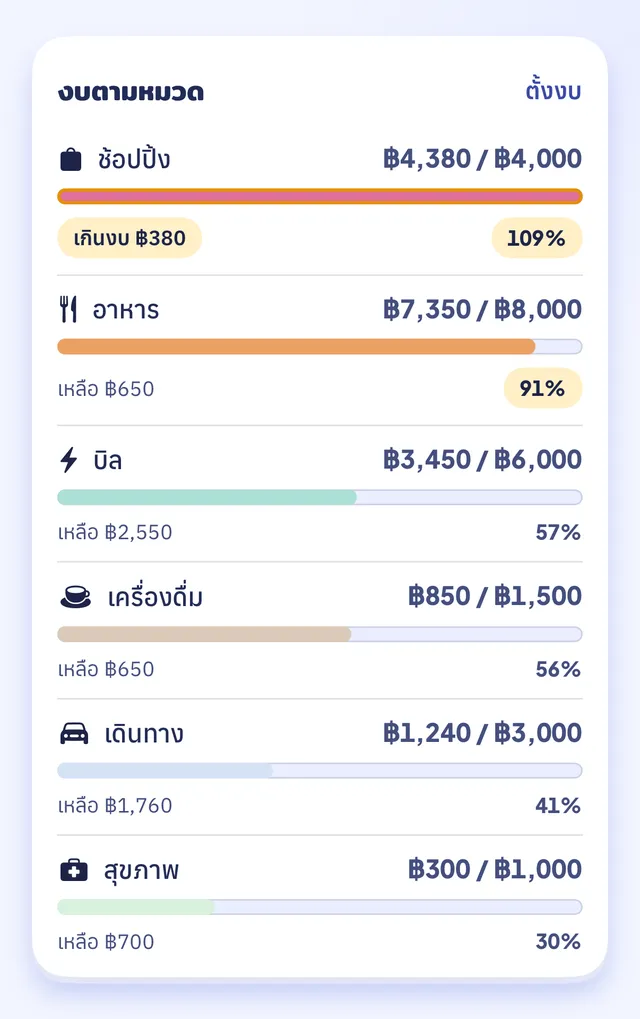
  • Or set budgets per category
  • Works for your Shared account budget and for your own personal one
  • The home screen shows whether you are spending less or more than last month, and by how much, comparing the same range of days
Sati per-category budget screen: shopping over budget at 109%, food at 91%, sample dataApp screenshot · sample data
Shared account

Share money in a Shared account, keep the rest private

Invite a partner or family member into the Shared account (not a bank account) with an invite code. Entries you share are visible to everyone in the Shared account. Entries you mark personal are visible only to you.

  • Switch between “Personal” and “Shared” with one tap
  • Move an entry between your personal account and the Shared account
Illustration, not an app screenshot
Wallets and cards

Split your money into wallets, and never miss a card date

Add cash, an account or a credit card as its own wallet. For a credit card you can store the statement date and the payment due date. The last 4 digits are optional.

  • No connection to your bank accounts. Entries come from what you type or from slips
  • Full card numbers are never stored
WalletsIllustration, sample figures
CashPersonal wallet
1,250 ฿
Credit card ···· 4821
Statement on the 25thDue on the 10th
8,430 ฿
Household suppliesShared wallet
3,100 ฿

And a few things that make logging complete

Type it yourself

Paid in cash or have no slip? Add the entry by hand with a category and a short note.

Photograph card receipts

Take a photo of a card slip with the camera. The photo and the receipt details stay on your phone.

Category suggestions

On iOS 26 or later the app suggests a category using Apple’s on-device model. Nothing is sent anywhere.

Get a copy of your data

Export your own data as a JSON file, up to 3 times a day.

New phone, nothing lost

Sign in with LINE on the new phone and your entries, Shared account and settings come back.

Notes (tags welcome)

Add a short note to any entry, and write tags inside the note if you like.

Why “Sati”?

Sati (สติ) is the Thai word for mindfulness: knowing where your money goes. It doesn’t mean you have to stop spending. Sati won’t scold you, judge you, or make you feel guilty about a favourite coffee. It just lays the numbers out clearly and leaves the decisions to you. (Satang, สตังค์, is a Thai word for money.)

Sati is coming to the App Store soon

Coming soon on theApp Store